
Add a Keyboard Language
This HowTo describes how to add a new keyboard-language layout — a new xx-YY entry
in the on-screen language picker (see Languages & Unicode Input for
the user-facing side).
The key idea: PolyKybd only relabels the keycaps; the host OS generates the characters. So a layout is really three things — a per-key codepoint map drawn on the OLEDs, a font that can render those codepoints, and a host hint that switches the OS input source. The firmware never composes characters and needs no input-method engine.
You edit a spreadsheet, run a few code generators and check the result in a preview tool. The
full decision table and every implemented locale are in the firmware repo at
keyboards/polykybd/lang/FUTURE_LANGUAGES.md.
All paths below are relative to keyboards/polykybd/ in the
qmk_firmware fork (branch PolyKybd),
except the host files, which are in
PolyKybdHost.
Before you start
Section titled “Before you start”Set up the firmware toolchain (see Build & Flash from Source) and a
Python environment with openpyxl cogapp pyyaml fonttools pillow. You only need the pinned
fontconvert build if the language introduces a new font or flag (see
Display Graphics & Fonts).
-
Classify the layout. This decides how much work it is:
Kind When Work Fold The OS layout is plain US-QWERTY (e.g. Indonesian) No key column — falls back to en-US; just a host fold xx=usClone A distinct layout identical to one already present Copy the source column; inherits its AltGr legends Clone + override A base layout plus a few extra AltGr letters (Welsh, Irish) Clone, then override those few keys New mapping A different keymap or new script (Sami, Pashto) Transcribe from xkb; maybe a new font General rule: identical keymap → fold; different keymap → its own column.
-
Get the layout data from an authoritative source. xkb is the reference (
/usr/share/X11/xkb/symbols/<file>). Its level-3 (AltGr) legends match Linux and Windows exactly; macOS Option differs, and the firmware carries one legend set, so treat AltGr as Linux/Windows-canonical. The HID protocol carries a fixed 2+2-char code, so an ISO-639-2/3 language needs a 2-char pseudo-code stored verbatim (Hawaiianhw, Soraniku-IQ). -
Add the per-key column. The language layouts are stored in a spreadsheet,
lang/lang_lut.xlsx— open it in LibreOffice Calc (or Excel) to see how the existing languages are laid out, one colour-coded column group per language, one row per key. You add your language as a new column of per-key codepoints, either by hand for a small clone/override or by extending one of thelang/_gen_*_cols.pyhelper scripts (model it on the existing ones) that emit the column and patch the sheet for you.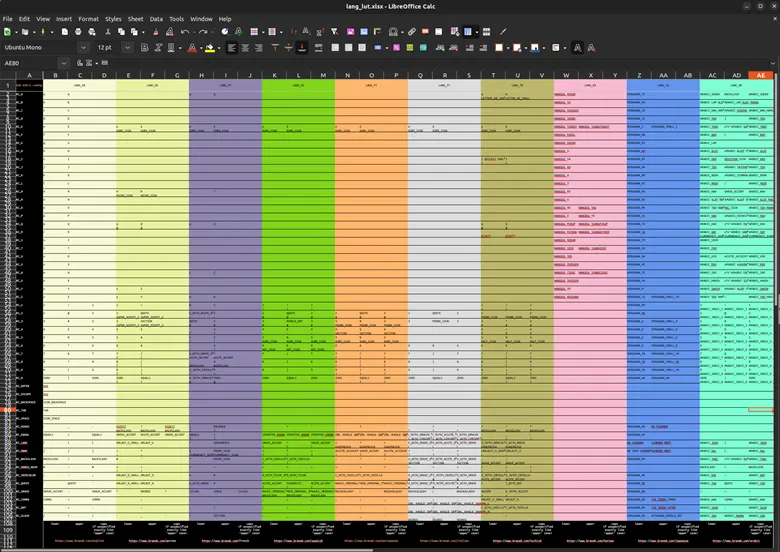
-
Handle fonts, if needed. Latin-1, Latin Extended-A/B are already present, so most European languages need zero new font work. A new script (Cherokee, Ethiopic) needs a Noto source font added to the font pipeline and a new category — see Display Graphics & Fonts and the Font Packs page.
-
Regenerate the code-generated files. The spreadsheet feeds several files through
cog. Run them all (or the language is only partly set up and “not selectable”):Terminal window cd keyboards/polykybdbash lang/run_cog.sh # re-cogs lang_lut, named glyphs, keycode helper, hid_com, poly_keymap -
Rebuild the region tables and flags. Regenerate the region-tab tables (which submenu the language appears under) and the country-flag glyph:
Terminal window bash fonts/gen-lang-fonts.sh # appends the new flag to flag_fonts.h -
Update the host. In PolyKybdHost, the country→region map (
polyhost/services/lang_regions.py) already covers every standard ISO country, so most languages need no edit. Add a fold entry only for a country with no native xkb layout. A new pseudo-code (non-ISO-639-1 language) must be appended to the frozen index tableiso_lang_country.py— which is byte-identical across three repos (firmware, host, test rig), so copy it to all three and verify withcmp. -
Verify the keycaps without hardware. Use the preview tool — it reproduces the firmware draw exactly, including the baseline shift, and flags clipped glyphs and overlaps:
Terminal window cd PolyKybdHost/toolspython oled_preview.py --lang xx-YY # contact sheet of all keyspython oled_preview.py --lang xx-YY --key KC_Q --overshoot 8 --cell-scale 8 # measure clippingpython oled_preview.py --lang xx-YY --channels # base/Shift/AltGr overlap check -
Build and commit. Compile both variants (
split72andsplit42share one keymap, so a language is added to both at once) and commit the firmware, host, and test-rig changes on their respective branches. Document the addition inlang/FUTURE_LANGUAGES.md.
Common problems
Section titled “Common problems”- A key with a
NULLbase legend falls back to en-US entirely for that key — its Shift/AltGr preview is never shown. Any key carrying a preview must also set a base. - AltGr descenders (ŷ ą ę, µ, ¶) can clip the bottom of the 40 px panel. Prefer a per-glyph
nudge over lowering a whole category. Always measure with
oled_preview --overshoot. - Re-cog all the generated files, and keep the frozen
iso_lang_country.pyidentical in all three repos.
See Contributing for how to open the pull requests.