
Trackpad
The split72 right half has a circular Cirque trackpad under the thumb.
The gestures
Section titled “The gestures”| Gesture | What you do | What you get |
|---|---|---|
| Move | Slide your thumb anywhere on the pad | Cursor motion |
| Left click | Tap — a short, deliberate press | Left button |
| Drag | Tap, then keep your thumb down and slide | Button held while you move |
| Right click | Tap in the top-right corner, around 1–2 o’clock | Right button |
| Scroll | Start in the top-left wedge around 10–11 o’clock, then circle | Wheel, as long as you keep circling |
Scrolling is a rotary dial: once started, turning clockwise scrolls down and anticlockwise scrolls up, for as many turns as you like. You can also start a dial anywhere on the outer ring near the pad’s edge — the top-left wedge exists because the ring is narrow on the axes and a wedge is easier to hit.
The pad on the status OLED
Section titled “The pad on the status OLED”While your thumb is on the pad, the right half’s 128×64 status OLED switches to a pad view: a circle with your finger’s position in it, a dotted ring marking where a dial can start, and markers on the two corner zones. It goes back to the normal status display a moment after you lift your thumb.
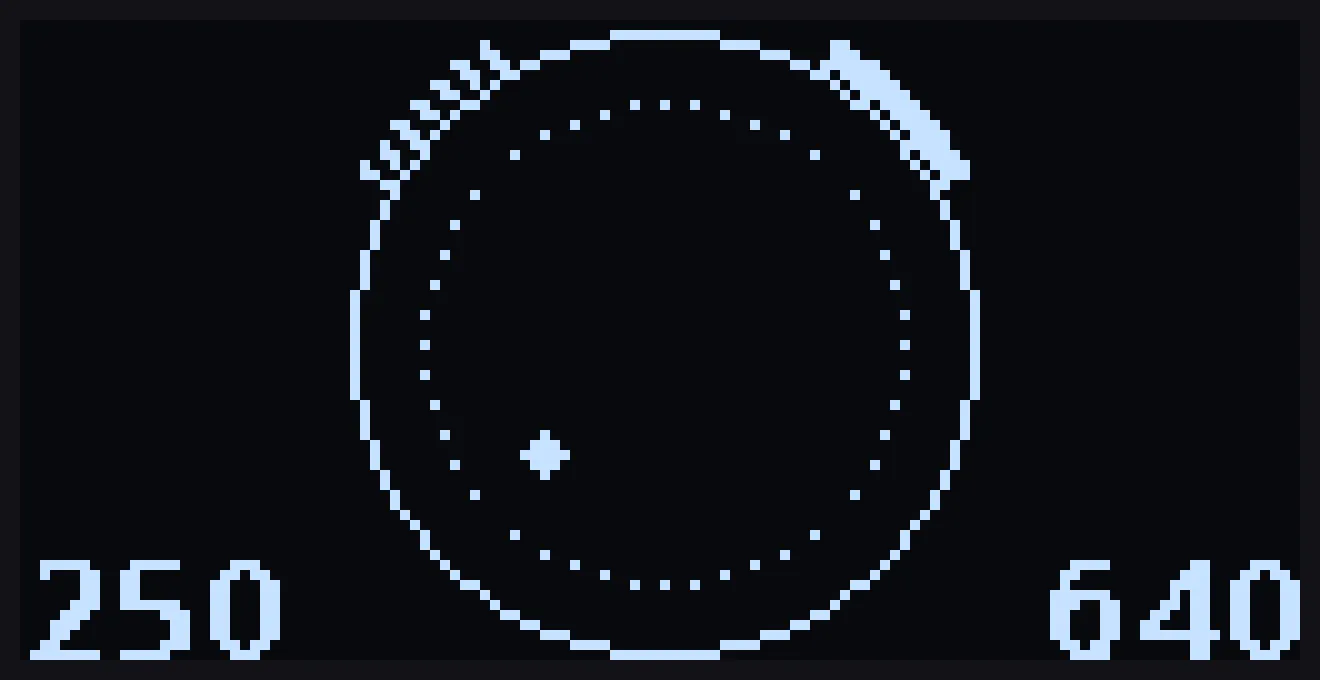
Reading it: the solid outer circle is the pad and the dotted ring is how far out a dial has to start. The solid marker at the top right is the right-click corner; the broken marker at the top left is the dial-start wedge, broken to match the dotted ring. So a broken mark means dial and a solid one means right click. The dot is your finger, and it grows for the moment a tap registers. The two numbers in the bottom corners are the raw pad coordinates, useful when a gesture does not work as expected.
That view is the fastest way to learn the zones — put your thumb down, watch where the dot is, and you no longer need to remember where the right-click corner and dial ring are.
Tracking behaviour
Section titled “Tracking behaviour”The firmware filters out jitter and stray jumps. Slow tracking stays steady, and a fast movement still crosses the screen.
A tap has to be a real press. Resting contact and hover are ignored, so the pad will not click because your thumb happens to be lying on it.
Going back to the default Cirque behaviour
Section titled “Going back to the default Cirque behaviour”The default Cirque gestures are still available as a build option. They are not recommended: the right-click corner is at 11 o’clock and scrolling does not work.
If you want to build them anyway:
qmk compile -kb polykybd/split72 -km default -e POLYKYBD_CIRQUE_RELATIVE=yesThis is a build-time choice, not a setting — there is nothing in the host app or on the keyboard that switches between the two.